INDUSTRY:

User Experience

CLIENT:

Exclusive Resorts

YEAR:

2025

TYPE:

Research
Rapid Prototyping, Using AI

Brief

Evaluating three LLM tools to supercharge rapid prototyping capabilities for Exclusive Resorts' engineering department.

Challenge

During my internship, I quickly noticed our Product Team was juggling an ever-growing workload of design and project management tasks. They were constantly time-crunched, managing everything from initial design concepts to developer handoffs, prototype testing, stakeholder presentations, and continuous ideation. The demand just kept stacking up.

What made this particularly challenging was that insufficient user testing was limiting our ability to deliver optimal user experiences. The core question became: how can we better prioritize user validation while managing these competing demands?


That's when I was assigned this exciting project: research and identify AI tools that could help us prototype designs faster, without constantly requiring developer involvement.


Unknown Discovery

Going into this research, I expected to find one definitive solution that would solve our challenges. That was my initial approach: identify THE tool. However, what I discovered was far more nuanced and interesting than a single answer.

I conducted comprehensive testing of three major platforms: Bolt, Claude, and Cursor. Each tool revealed distinct capabilities and strengths, making the evaluation process more complex but ultimately more valuable than I had anticipated.


Findings

View on Figjam

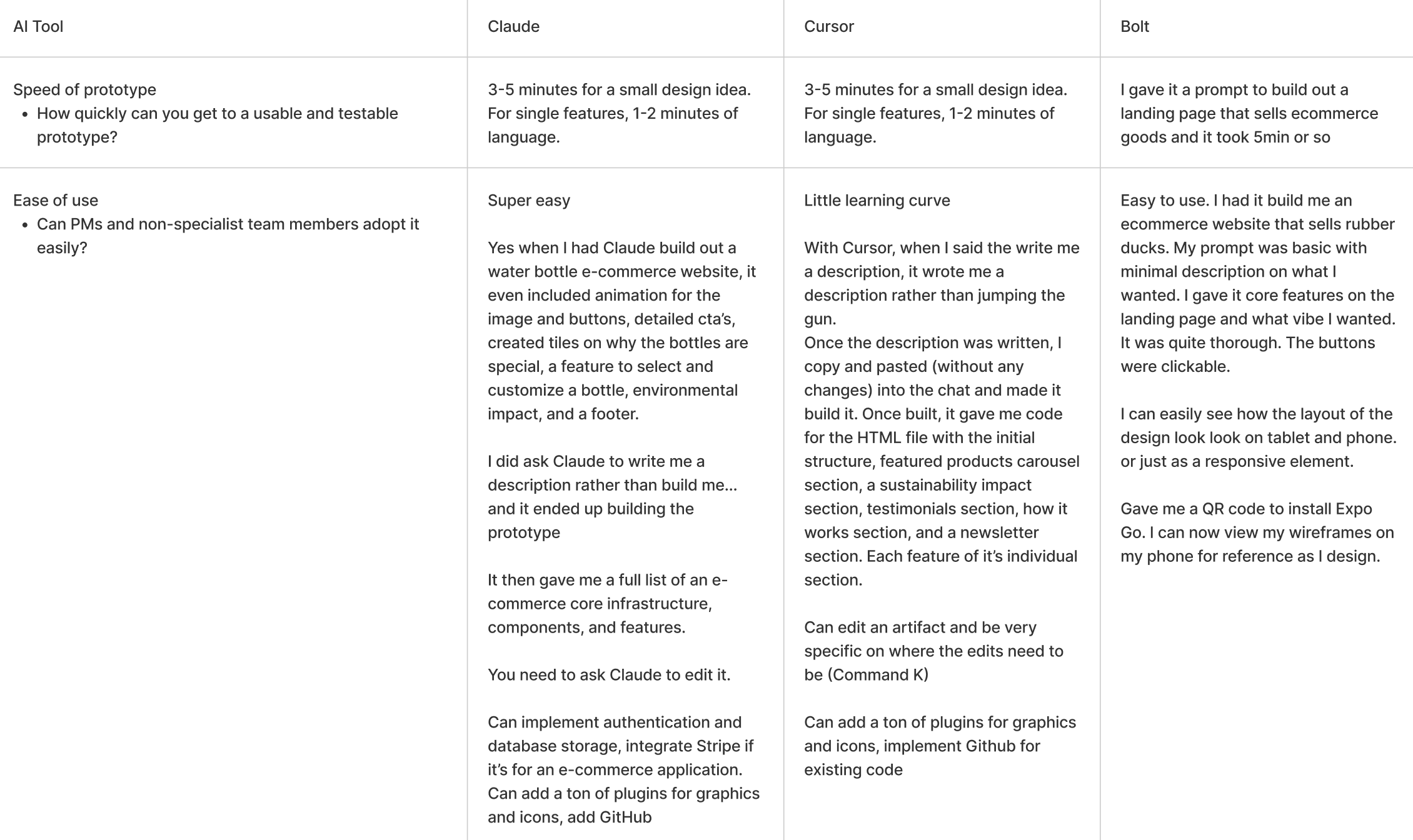
The table of information for each tool: speed of prototyping, ease of use, collaboration, capabilities, compatibility, etc.

Each Tool’s Potential

Claude - The Intelligent Design Partner:

What I really liked about Claude was it’s ability to take screen shots of my designs and prototype is with ease. There was not much reworking the design and it also offered new ideas for hover states and animations. The only caveat was that it could not handle large and complex designs. Unfortunately when you need to make adjustments to the prototype, Claude will rewrite the whole article over and over again. The ability to be specific with changes was difficult to navigate. My Claude research was based off of Anthropic Sonnet 4.

But Anthropic continues to create incredible tools great for ideation. I very much look forward to seeing what they offer in the future.

An example of what Claude produced with a short prompt, asking to have it build me a traveling website. Cute, simple, fun interactions.

Bolt - The Precision Specialist:

Bolt proved fascinating because while it required more detailed guidance (definitely less intuitive than Claude), it offered incredible precision for modifying and reworking specific design elements. It could handle more complex designs effectively, but required very precise instructions. Having some coding knowledge would significantly enhance Bolt's capabilities.

An example of what Bolt produced with a short prompt, asking to have it build me a traveling website. Simple, to the point, but missing some elements.

Cursor - The Developer-Centric Powerhouse:

Cursor was impressive but felt underutilized in my hands. This tool is clearly designed for developers, and while designers can use it without coding knowledge, having that technical foundation is essential to unlock its full potential. It's powerful, but requires more technical expertise than our target users typically possess. I had noticed that the designs I asked it to create came out sophisticated and clean, while Claude and Bolt produced for “cute” and “playful” designs. Cursor was exceptional with creating beautiful designs used for inspiration during the ideation phase.

An example of what Cursor produced with a short prompt, asking to have it build me a traveling website. Clean, sleek, very good interactions and hover states.

Privacy Considerations

An crucial aspect of this research was navigating privacy requirements. Working with free accounts meant being extremely careful about not sharing sensitive company information. This added a strategic layer to my testing process that could ultimately harm the company and/or individuals. Using these tools taught me to always be hyper aware of the details and the information I was using.

Contraints

Working with AI tools presented genuine challenges. I had to be hyper specific when it came to prompts and communication with the tool. I had learned that the AI isn't sophisticated enough to interpret vague instructions – we still need to be highly specific and provide comprehensive prompts to achieve quality results without extensive revisions.

This challenge actually enhanced my skill set significantly. I gained valuable insights into how different LLMs operate, figure out how to talk to the tool in order to receive valuable feedback.

Presenting to The Engineering Team

After weeks of comprehensive testing, analysis, and documentation, I presented my findings to the head of our Engineering department. The presentation was well-received, and I received immediate approval for premium Claude and Bolt subscriptions.

Following this approval, we officially transitioned away from ChatGPT and implemented Claude and Bolt into our design process. This felt like strong validation of the research methodology and conclusions I had developed.

Master Prototyping Prompt

With our premium subscriptions secured, I developed what I called our "master prompt" – a comprehensive framework to help AI understand our specific requirements, company tone, and design standards.

The team and I created projects incorporating our previous work, documented our brand voice, and developed detailed prompts covering styles, tone, device specifications, and other parameters. This system essentially served as a specialized user manual for AI collaboration tailored to our team's needs.

Application & Delivery

I was then assigned to create a partial prototype for the Community feature – a new addition to Exclusive Resorts enabling member-to-member connections. I focused on developing the directory flow, creating clear visualizations for stakeholders showing how members would view connected members and discover suggested connections.

Key Insights

Based on my research, Claude emerged as the optimal tool for designers and product managers due to its minimal learning curve and intuitive interface. The constraint with Claude is not being able to prototype large and complex designs. It’s perfect for smaller and specific features to help demonstrate to designers what PM’s might need.


While Bolt is perfect for larger and more complex designs. The ability to fix prototypes with a fine-tooth comb is helpful for reworking. Bolt also is more dev friendly - being able to produce well laid out developer handoff docs for production.

The Benefits

Demonstrations & Testing - Product managers can use AI to demonstrate new feature concepts, show design iterations, and facilitate more comprehensive user testing.


Development Efficiency: Significantly reduces back-and-forth communication with developers during the initial design phase.


Time Optimization: Enables rapid creation of accurate prototyped designs, accelerating the overall design timeline.


Stakeholder Approval: Facilitates faster design sign-off from stakeholders through high-quality visual presentations.

Final Thoughts

This research project not only solved our immediate prototyping challenges but also opened up new possibilities for design workflow optimization. The integration of AI tools has fundamentally changed how we approach rapid prototyping, making it more accessible to non-technical team members - giving our developers more time to focus on handoff designs - while maintaining professional quality standards.

The experience taught me that the future of design isn't about replacing human creativity – It’s about being inspired and pushed using intelligent tools that handle the technical execution while we focus on strategy, user experience, and innovation.

More to Explore

About

Resume

LinkedIn

Email

Want to create something together?

I want in. Lets meet and connect!

Kira

About

Resume

LinkedIn

Email

INDUSTRY:

User Experience

CLIENT:

Exclusive Resorts

YEAR:

2025

TYPE:

Research
Rapid Prototyping, Using AI

Brief

Evaluating three LLM tools to supercharge rapid prototyping capabilities for Exclusive Resorts' engineering department.

Challenge

During my internship, I quickly noticed our Product Team was juggling an ever-growing workload of design and project management tasks. They were constantly time-crunched, managing everything from initial design concepts to developer handoffs, prototype testing, stakeholder presentations, and continuous ideation. The demand just kept stacking up.

What made this particularly challenging was that insufficient user testing was limiting our ability to deliver optimal user experiences. The core question became: how can we better prioritize user validation while managing these competing demands?


That's when I was assigned this exciting project: research and identify AI tools that could help us prototype designs faster, without constantly requiring developer involvement.

Unknown Discovery

Going into this research, I expected to find one definitive solution that would solve our challenges. That was my initial approach: identify THE tool. However, what I discovered was far more nuanced and interesting than a single answer.

I conducted comprehensive testing of three major platforms: Bolt, Claude, and Cursor. Each tool revealed distinct capabilities and strengths, making the evaluation process more complex but ultimately more valuable than I had anticipated.

Findings

View on Figjam

The table of information for each tool: speed of prototyping, ease of use, collaboration, capabilities, compatibility, etc.

Each Tool’s Potential

Claude - The Intelligent Design Partner:

What I really liked about Claude was it’s ability to take screen shots of my designs and prototype is with ease. There was not much reworking the design and it also offered new ideas for hover states and animations. The only caveat was that it could not handle large and complex designs. Unfortunately when you need to make adjustments to the prototype, Claude will rewrite the whole article over and over again. The ability to be specific with changes was difficult to navigate. My Claude research was based off of Anthropic Sonnet 4.

But Anthropic continues to create incredible tools great for ideation. I very much look forward to seeing what they offer in the future.

An example of what Claude produced with a short prompt, asking to have it build me a traveling website. Cute, simple, fun interactions.

Bolt - The Precision Specialist:

Bolt proved fascinating because while it required more detailed guidance (definitely less intuitive than Claude), it offered incredible precision for modifying and reworking specific design elements. It could handle more complex designs effectively, but required very precise instructions. Having some coding knowledge would significantly enhance Bolt's capabilities.

An example of what Bolt produced with a short prompt, asking to have it build me a traveling website. Simple, to the point, but missing some elements.

Cursor - The Developer-Centric Powerhouse:

Cursor was impressive but felt underutilized in my hands. This tool is clearly designed for developers, and while designers can use it without coding knowledge, having that technical foundation is essential to unlock its full potential. It's powerful, but requires more technical expertise than our target users typically possess. I had noticed that the designs I asked it to create came out sophisticated and clean, while Claude and Bolt produced for “cute” and “playful” designs. Cursor was exceptional with creating beautiful designs used for inspiration during the ideation phase.

An example of what Cursor produced with a short prompt, asking to have it build me a traveling website. Clean, sleek, very good interactions and hover states.

Privacy Considerations

An crucial aspect of this research was navigating privacy requirements. Working with free accounts meant being extremely careful about not sharing sensitive company information. This added a strategic layer to my testing process that could ultimately harm the company and/or individuals. Using these tools taught me to always be hyper aware of the details and the information I was using.

Contraints

Working with AI tools presented genuine challenges. I had to be hyper specific when it came to prompts and communication with the tool. I had learned that the AI isn't sophisticated enough to interpret vague instructions – we still need to be highly specific and provide comprehensive prompts to achieve quality results without extensive revisions.

This challenge actually enhanced my skill set significantly. I gained valuable insights into how different LLMs operate, figure out how to talk to the tool in order to receive valuable feedback.

Presenting to The Engineering Team

After weeks of comprehensive testing, analysis, and documentation, I presented my findings to the head of our Engineering department. The presentation was well-received, and I received immediate approval for premium Claude and Bolt subscriptions.

Following this approval, we officially transitioned away from ChatGPT and implemented Claude and Bolt into our design process. This felt like strong validation of the research methodology and conclusions I had developed.

Master Prototyping Prompt

With our premium subscriptions secured, I developed what I called our "master prompt" – a comprehensive framework to help AI understand our specific requirements, company tone, and design standards.

The team and I created projects incorporating our previous work, documented our brand voice, and developed detailed prompts covering styles, tone, device specifications, and other parameters. This system essentially served as a specialized user manual for AI collaboration tailored to our team's needs.

Application & Delivery

I was then assigned to create a partial prototype for the Community feature – a new addition to Exclusive Resorts enabling member-to-member connections. I focused on developing the directory flow, creating clear visualizations for stakeholders showing how members would view connected members and discover suggested connections.

Key Insights

Based on my research, Claude emerged as the optimal tool for designers and product managers due to its minimal learning curve and intuitive interface. The constraint with Claude is not being able to prototype large and complex designs. It’s perfect for smaller and specific features to help demonstrate to designers what PM’s might need.


While Bolt is perfect for larger and more complex designs. The ability to fix prototypes with a fine-tooth comb is helpful for reworking. Bolt also is more dev friendly - being able to produce well laid out developer handoff docs for production.

The Benefits

Demonstrations & Testing - Product managers can use AI to demonstrate new feature concepts, show design iterations, and facilitate more comprehensive user testing.


Development Efficiency: Significantly reduces back-and-forth communication with developers during the initial design phase.


Time Optimization: Enables rapid creation of accurate prototyped designs, accelerating the overall design timeline.


Stakeholder Approval: Facilitates faster design sign-off from stakeholders through high-quality visual presentations.

Final Thoughts

This research project not only solved our immediate prototyping challenges but also opened up new possibilities for design workflow optimization. The integration of AI tools has fundamentally changed how we approach rapid prototyping, making it more accessible to non-technical team members - giving our developers more time to focus on handoff designs - while maintaining professional quality standards.

The experience taught me that the future of design isn't about replacing human creativity – It’s about being inspired and pushed using intelligent tools that handle the technical execution while we focus on strategy, user experience, and innovation.

More to Explore

About

Resume

LinkedIn

Email

Want to create something together?

I want in. Lets meet and connect!

Kira

About

Resume

LinkedIn

Email

INDUSTRY:

LLM

CLIENT:

Exclusive Resorts

YEAR:

2025

TYPE:

Research

Rapid Prototyping, Using AI
Brief

Evaluating three LLM tools to supercharge rapid prototyping capabilities for Exclusive Resorts' engineering department.

Challenge

During my internship, I quickly noticed our Product Team was juggling an ever-growing workload of design and project management tasks. They were constantly time-crunched, managing everything from initial design concepts to developer handoffs, prototype testing, stakeholder presentations, and continuous ideation. The demand just kept stacking up.

What made this particularly challenging was that insufficient user testing was limiting our ability to deliver optimal user experiences. The core question became: how can we better prioritize user validation while managing these competing demands?


That's when I was assigned this exciting project: research and identify AI tools that could help us prototype designs faster, without constantly requiring developer involvement.


Pivots

Going into this research, I expected to find one definitive solution that would solve our challenges. That was my initial approach: identify THE tool. However, what I discovered was far more nuanced and interesting than a single answer.

I conducted comprehensive testing of three major platforms: Bolt, Claude, and Cursor. Each tool revealed distinct capabilities and strengths, making the evaluation process more complex but ultimately more valuable than I had anticipated.


Findings

View on Figjam

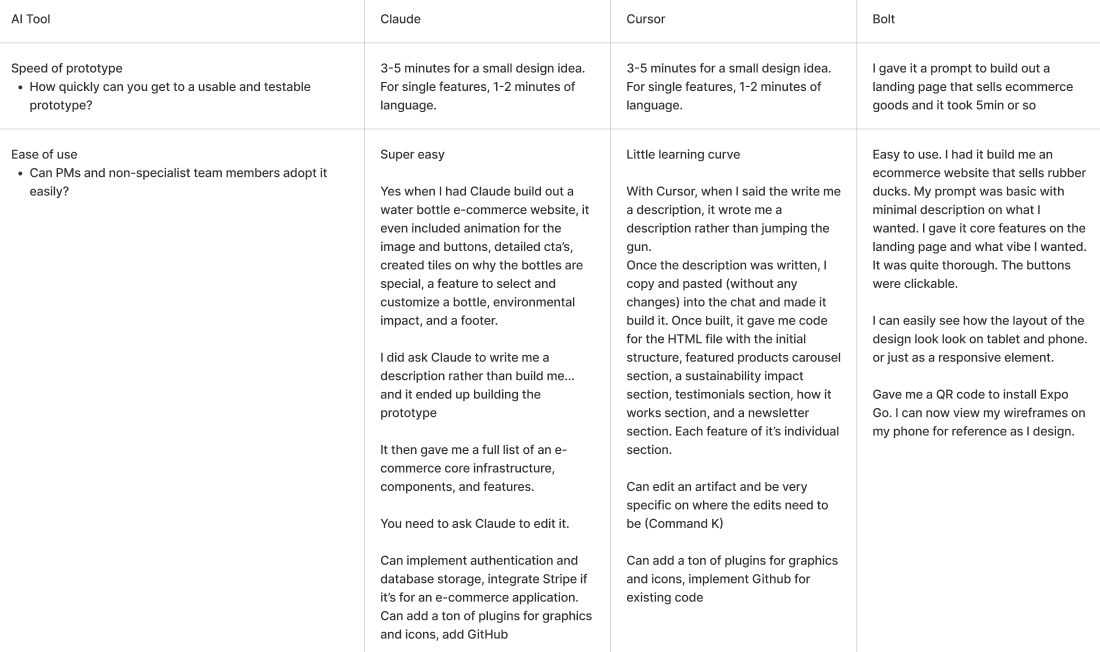
The table of information for each tool: speed of prototyping, ease of use, collaboration, capabilities, compatibility, etc.

Privacy Considerations

An crucial aspect of this research was navigating privacy requirements. Working with free accounts meant being extremely careful about not sharing sensitive company information. This added a strategic layer to my testing process that could ultimately harm the company and/or individuals. Using these tools taught me to always be hyper aware of the details and the information I was using.

Each Tool’s Potential

Claude - The Intelligent Design Partner:


What I really liked about Claude was it’s ability to take screen shots of my designs and prototype is with ease. There was not much reworking the design and it also offered new ideas for hover states and animations. The only caveat was that it could not handle large and complex designs. Unfortunately when you need to make adjustments to the prototype, Claude will rewrite the whole article over and over again. The ability to be specific with changes was difficult to navigate. My Claude research was based off of Anthropic Sonnet 4.

But Anthropic continues to create incredible tools great for ideation. I very much look forward to seeing what they offer in the future.

An example of what Claude produced with a short prompt, asking to have it build me a traveling website. Cute, simple, fun interactions but no placeholder images.

Bolt - The Precision Specialist:


Bolt proved fascinating because while it required more detailed guidance (definitely less intuitive than Claude), it offered incredible precision for modifying and reworking specific design elements. It could handle more complex designs effectively, but required very precise instructions. Having some coding knowledge would significantly enhance Bolt's capabilities.

An example of what Bolt produced with a short prompt, asking to have it build me a traveling website. Simple, to the point, but missing some elements.

Cursor - The Developer-Centric Powerhouse:


Cursor was impressive but felt underutilized in my hands. This tool is clearly designed for developers, and while designers can use it without coding knowledge, having that technical foundation is essential to unlock its full potential. It's powerful, but requires more technical expertise than our target users typically possess. I had noticed that the designs I asked it to create came out sophisticated and clean, while Claude and Bolt produced for “cute” and “playful” designs. Cursor was exceptional with creating beautiful designs used for inspiration during the ideation phase.
An example of what Cursor produced with a short prompt, asking to have it build me a traveling website. Clean, sleek, very good interactions and hover states.

Privacy Considerations

Working with AI tools presented genuine challenges. Even with free subscription limitations, I had to develop considerable finesse in communicating with these platforms. The AI isn't sophisticated enough to interpret vague instructions – we still need to be highly specific and provide comprehensive prompts to achieve quality results without extensive revisions.

This challenge actually enhanced my skill set significantly. I gained valuable insights into how different LLMs operate, learned developer processes and terminology, and developed an entirely new set of capabilities I hadn't expected to acquire during my internship.

Contraints

Working with AI tools presented genuine challenges. I had to be hyper specific when it came to prompts and communication with the tool. I had learned that the AI isn't sophisticated enough to interpret vague instructions – we still need to be highly specific and provide comprehensive prompts to achieve quality results without extensive revisions.

This challenge actually enhanced my skill set significantly. I gained valuable insights into how different LLMs operate, figure out how to talk to the tool in order to receive valuable feedback.

Presenting to The Engineering Team

After weeks of comprehensive testing, analysis, and documentation, I presented my findings to the head of our Engineering department. The presentation was well-received, and I received immediate approval for premium Claude and Bolt subscriptions.

Following this approval, we officially transitioned away from ChatGPT and implemented Claude and Bolt into our design process. This felt like strong validation of the research methodology and conclusions I had developed.

Master Prototyping Prompt

With our premium subscriptions secured, I developed what I called our "master prompt" – a comprehensive framework to help AI understand our specific requirements, company tone, and design standards.

The team and I created projects incorporating our previous work, documented our brand voice, and developed detailed prompts covering styles, tone, device specifications, and other parameters. This system essentially served as a specialized user manual for AI collaboration tailored to our team's needs.

Application & Delivery

I was then assigned to create a partial prototype for the Community feature – a new addition to Exclusive Resorts enabling member-to-member connections. I focused on developing the directory flow, creating clear visualizations for stakeholders showing how members would view connected members and discover suggested connections.

Key Insights

Based on my research, Claude emerged as the optimal tool for designers and product managers due to its minimal learning curve and intuitive interface. The constraint with Claude is not being able to prototype large and complex designs. It’s perfect for smaller and specific features to help demonstrate to designers what PM’s might need.


While Bolt is perfect for larger and more complex designs. The ability to fix prototypes with a fine-tooth comb is helpful for reworking. Bolt also is more dev friendly - being able to produce well laid out developer handoff docs for production.

The Benefits

Demonstrations & Testing - Product managers can use AI to demonstrate new feature concepts, show design iterations, and facilitate more comprehensive user testing.


Development Efficiency: Significantly reduces back-and-forth communication with developers during the initial design phase.


Time Optimization: Enables rapid creation of accurate prototyped designs, accelerating the overall design timeline.


Stakeholder Approval: Facilitates faster design sign-off from stakeholders through high-quality visual presentations.

Final Thoughts

This research project not only solved our immediate prototyping challenges but also opened up new possibilities for design workflow optimization. The integration of AI tools has fundamentally changed how we approach rapid prototyping, making it more accessible to non-technical team members - giving our developers more time to focus on handoff designs - while maintaining professional quality standards.

The experience taught me that the future of design isn't about replacing human creativity – It’s about being inspired and pushed using intelligent tools that handle the technical execution while we focus on strategy, user experience, and innovation.

More to Explore

About

Resume

LinkedIn

Email

Want to create something together?

I want in. Lets meet and connect!